Over the course of the past several years, Samsung’s One UI has drastically changed. In the beginning, One UI 1.0 made Android much easier to use and understand than ever before, and now we have an advanced, AI-powered collection of devices in the Galaxy S and Z series.
One UI 7 was focused on maximising the potential of personalisation, enhancing productivity through integrated connectivity with other devices, and locking in an even closer knit experience for users in Galaxy’s universe.
However, with One UI 8, Samsung is taking a step towards expanding the possibilities that AI and system intelligence provide in developing a streamlined look and feel.
In this article, we are going to take an in-depth look at both versions with respect to their visual design, performance advances and how the upgrades have changed the level of safety and security as well as customisation choices available. And how much of an increase in AI they provide.
So let’s dig in!
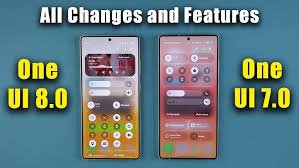
1.The Evolution or Revolution of the Design Philosophy?
One UI 7: Mature, Polished, Familiar
The design of One UI 7 took features such as the use of rounded shapes, clean/clear layouts and a clear focus on ergonomics to allow for one-handed operation and build upon them to create a user interface with smooth, fluid animations, as well as a consistent look and feel. The overall feel was minimalistic yet vibrant in the visual elements and useful, and maintained a consistent look and feel throughout the interface and throughout the app.
One UI 8: Minimalism Reimagined
Samsung went much further with One UI 8 to reflect a design that is more futuristic than previous versions. The most significant visual differences from the previous version are listed below:
- More fluid animations due to improved frame smoothing.
- Redesigned, flatter, and more dynamic, icon representations.
- Adaptive colour accents to provide more gradual changes depending on the brightness of the wallpaper.
- Edge-to-edge UI components offer a cleaner and less cluttered appearance.
The end result was a cleaner and more futuristic UI that feels lighter and more refined than the previous version. If One UI 7 was refined, One UI 8 is a more premium version.
Overall, One UI 8 is better than One UI 7—not necessarily because of the drastic change in appearance, but due to its modernized and more fluid design.
2. Performance and System Improvements
The focus of One UI 7 is Performance and system improvements through optimization.
Samsung’s One UI 7 places a high priority on performance optimization.
The launch of applications feels fast, RAM management is considerably improved, especially on mid-range smartphones.
Samsung also focused heavily on optimizing the battery management system of One UI 7.
One UI 8 offers Performance Improvements based on Artificial Intelligence.
Along with traditional Performance Optimizations offered through One UI 8, Samsung has included Performance Optimizations based on A.I.
AI-based resource allocation allows Samsung to predict which applications you will be using next by analysing your usage patterns.
The Adaptive Performance Profiles allow Samsung to modify the functionality of the CPU and GPU profiles based on the user habits.
Enhanced Thermal Management provides relief for those long gaming sessions.
Algorithms that Prioritise Task Switching allow users to switch between applications seamlessly.
Because of these changes, Power Efficiency and increased Thermal Management, there are significant improvements in Power Efficiency and Thermal Management for both Flagship and Mid-range Smartphone Models.
Final Thoughts:
With the introduction of the One UI 8 software, users can expect to see a significant improvement in Performance, particularly for those who Multi-task and/or Play Games.
Samsung Artificial Intelligence Experience – The Greatest Leap Forward
The Introduction of AI with One UI 7.
Samsung brought to the masses a selection of AI features in One UI 7 for the Galaxy series. Some of the first AI tools included:
- Generative text assistance
- Interpreter mode
- Photo editing with object erasure
- Basic improvements to speech to text
Although One UI 7 represented a considerable advancement, it was still in its infancy.
The Introduction of AI in One UI 8.
Samsung integrated AI throughout its entire operating system (OS) in One UI 8, which Samsung refers to as “Contextual Intelligence”. This means the phone will be able to understand what you are doing and be able to respond appropriately.
Some examples of new AI capabilities in One UI 8 include:
1) AI Smart Suggestions 2.0
Through this feature, users will have the ability to receive intelligent recommendations on:
- Replies
- Actions (Copy/paste, Translate/share, etc.)
- Adjustments to the user’s settings based on his/her environment
- Switching between modes (Gaming, Driving, Studying, etc.)
2) Galaxy Camera AI Boost
3) AI Call Handling
4) Offline AI Capabilities.
4.Customizing Your Experience
Samsung has a long history of providing users with the ability to customize their devices however they’d like. One UI 7 included:
Good Lock
The capability to choose from many different themes.
The ability to customize your lock screen.
Flexible color and sizing of widgets.
Overall, One UI 7 did not leave anything lacking.
In terms of personalizing your device, One UI 8 raised the bar for customization even higher. With One UI 8 you will find:
Dynamic theme packs based on weather, time and location.
Mobile wallpapers generated by AI.
Interactivity of your Always On Display with animations.
Lock screen widgets that provide more granular control than One UI 7.
With One UI 8, your phone will provide more personalized routines that use AI to learn.
Now modes and routines have a more intelligent feel, learning your habits over time, and adjusting automatically.
Overall, both versions are highly customizable, however One UI 8 provides a higher degree of personalized creative design.
Multi-Tasking and
One UI 7 provided the tools needed for power users to be as productive as possible, such as
Smart Pop Up View, multitasking gestures, split screen mode, and improvements made to DeX to allow a seamless transition from the phone to the TV.
One UI 8 continues to build on top of this with some refinements that create an overall more seamless multi-tasking experience.
Pairing two applications side-by-side is even more seamless with One UI 8. Resizable floating windows now respond in a more intuitive way. Dragging and dropping files across apps is a smoother experience. AI now predicts the apps that the user wants in split screen mode. Samsung DeX is now more stable, with the added benefit of being able to scale to a higher resolution.
For the power users that use their phones as a mini-laptop, these refinements will be huge improvements.
6.To summarize, One UI 7 had an excellent camera and gallery layout;
it introduced some quick-toggles for camera settings as well as updated some manual controls. For the gallery app, smart organization of photos and limited editing functions were introduced.
One UI 8 further offers enhanced user experience and artificial intelligence (AI) advancements.
For example, one of these improvements was Smart Scene Detection (AI) which allowed users to identify subjects in photos automatically and make edits accordingly. Other features include improvements to the Pro Mode for more simplified usage and enhancements to live previews, which provide users with a clearer view of what the camera sees.
Additionally, some extra improvements were made for each gallery app. For example, the ability to recognize objects more accurately in the gallery app was improved, and Automatic Albums and Memories were created similar to iOS.
Many of the enhancements made to One UI 8, such as video stabilization and movement photography, will also help enhance both everyday use and artistic pursuits, making the transition from One UI 7 to One UI 8 easily noticeable.
7.As discussed previously, One UI 7 had excellent battery capabilities.
The good battery performance was achieved due to the effective way in which apps operate in the background (utilizing less power).
One UI 8 offers smarter battery technology (AI), which allows for the following:
Adaptive Charging 2.0 (able to charge the battery at a slower rate overnight to minimize battery wear).
AI Technology to sleep applications intelligently.
Optimized battery profiles depending on users’ usage patterns.
Heat reduction, which will provide longer battery life to users’ devices.
Overall, these advancements will provide users longer-lasting devices over the months—not just on a per-charge basis.
Security and Privacy—More Transparency, More Power
One UI 7: The Foundation
One UI 7 had strong security features, such as Samsung Knox, pop-up permission management, and the Privacy Dashboard.
One UI 8: Total Transparency
In addition to these powerful security features, One UI 8 introduces
AI-powered threats
Improved Secure Folder Encrypted contents
On-Device AI processing of sensitive information
App behaviour logs illustrating precisely what apps are accessing
Micro-permission (one-time use, limited frequency of use, or timed use)
Samsung has made privacy simpler and more straightforward.
Conclusion
While One UI 7 and One UI 8 offer comparable security, One UI 8 includes more control and transparency.
Compatibility and Support Across Devices
The One UI 7 supports a range of devices, from high-end to mid-range.
The One UI 8 exceptional compatibility extends the pattern of One UI 7, yet optimizes features based on hardware capability.
The flagship devices will include most of the AI features.
Mid-range devices will feature AI, albeit in reduced form.
Flexible-device (foldable) users will have the opportunity for an optimized layout experience.
One UI 8 takes enormous strides in providing optimized Solutions for the foldable device user (Flex Mode) compared to previous versions.
Conclusion
If you recently purchased a Galaxy Device, then One UI 8 will offer you the most value for your money; if you own an older device, you won’t be able to access all of the One UI 8’s features.
Overall User Experience
One UI 7 has:
Smooth, stable, customizable, and optimized Performance.
One UI 8 is:
More intelligent, faster, more responsive, more intuitive, and More Future-Proof.
Through One UI 8, Samsung is not only providing Power, but a phone that really will assist you.
finally Your Decision on One UI 8: Should You Upgrade?
If your device is compatible, then most certainly yes.
In short, we really like One UI 8 because:
If you decide to upgrade, you will receive:
- Improved Performance
- Smarter AI capabilities
- Fresh Look
- Longer Lasting Battery
- Customizing Your Device
- Upgraded Camera Tools
If you are staying with One UI 7, it would likely be because:
- Your device does not support One UI 8 completely.
- You are used to having very few changes to how your device functions.
- You still use applications that were created for an older version of Android and have not yet been upgraded.
Summary of One UI 8 and Where Samsung’s Software is Going:
Samsung’s One UI has always concentrated on usability improvement. With One UI 7, Samsung has created a more functional version of its software with greater stability and customizability. With One UI 8, there is now more sophistication in terms of intelligent predictive functionality, and Samsung’s design approach is more modern.
Therefore, One UI 8 is not just a software upgrade; it represents a shift in how Samsung visualized the capabilities of the phone. Instead of focusing on just how much your phone can do, Samsung has started to show how apps will be integrated into people’s lifestyles through AI.
If Samsung retains this focus in its evolution of One UI 9 and beyond, Samsung will probably continue to create a greater emphasis on AI intelligence and efficiency by integrating it into all its Galaxy products more seamlessly.